


How do I make a secure copy of my ID with the KopieID app?
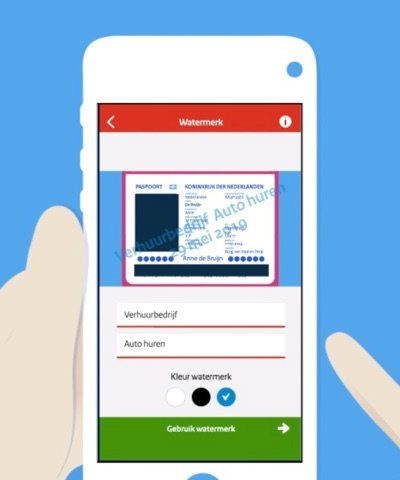

You can easily make a secure copy of your ID with the Dutch government's free KopieID app.
Has SuperShortlease asked for a copy of your driving licence or passport? Then the front is enough. Make sure you always cross out your citizen service number (BSN). It's the most privacy-sensitive detail on your document and we don't need it.
In this blog you'll read why a secure copy matters, how the KopieID app works and how to send us your documents securely.
Why make a secure copy of your ID?
Identity fraud is when someone else uses your identity details. This often happens with a copy of a passport, ID card or driving licence. With your name, date of birth and BSN, a fraudster could, for example, take out a loan or a phone contract in your name. The bills then end up with you.
So never just hand over your ID. An organisation that asks for a copy should be able to explain why it's needed. And never share more details than the recipient really needs. That's what a secure copy is for: you hide unnecessary details and state on the copy who it's for and what it's for.
What is the KopieID app?
The KopieID app is a free app from the National Office for Identity Data (RvIG), part of the Ministry of the Interior and Kingdom Relations. It lets you use your phone or tablet to make a secure copy of your ID. You cross out details the recipient doesn't need and add a watermark. If the copy does fall into the wrong hands, it's much harder to misuse.
You can download the app from the App Store (iPhone and iPad) or the Google Play Store (Android). The app recognises Dutch identity documents, such as passports, ID cards, driving licences and residence documents, as well as documents from Bonaire, Sint Eustatius and Saba. It doesn't recognise foreign ID documents.
How does the KopieID app work?
You make a secure copy in four steps:
- Take a photo of your document. Open the app and point the camera at your ID. The app recognises the document and takes the photo itself. Make sure there's enough light, ideally daylight, place the document on a dark, flat surface and keep your fingers out of shot.
- Choose which details to cross out. The app shows a list of all the details on the document. You choose what the recipient doesn't need, such as your BSN, and the app crosses those details out automatically.
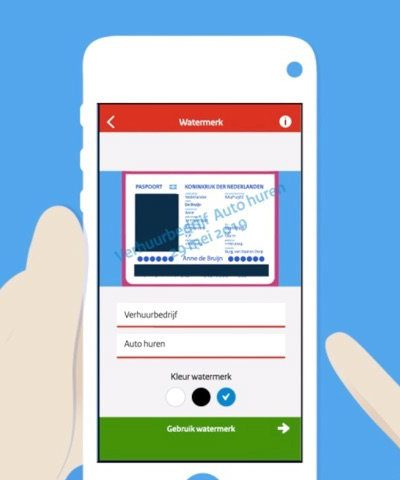
- Add a watermark. Fill in who the copy is for and what it's for, for example ‘SuperShortlease, shortlease application’. The date is always added to the copy automatically.
- Share the copy. Use the share button to send the copy, for example by email or through another app. You can also print it.
Want to use the copy again later? You can store it in the app if your phone is secured with a code, fingerprint or face recognition. The copy is then stored encrypted in the app and doesn't end up in your photo gallery. The video below shows how it works.
Which details should you cross out?
Which details you hide depends on who's receiving the copy and why. In any case, watch out for these details:
- Citizen service number (BSN): the most privacy-sensitive detail on your ID. If the recipient doesn't need it, always cross it out.
- Passport photo: cross out your photo if the recipient doesn't need it to check who you are.
- Signature: you can also hide your signature if it isn't needed.
Do leave the details the recipient needs to verify your identity, such as your name and date of birth. For a shortlease application with SuperShortlease, the front of your driving licence and passport is enough, and we don't need your BSN.
How to send your documents to SuperShortlease
Have you accepted our quote? Then you'll receive an email inviting you to our secure online customer portal. There you upload your documents as a photo or PDF, so you don't need to send anything by email. We use these documents to carry out a credit check.
Which documents we ask for depends on the type of contract:
- Personal: a copy of your driving licence and passport, a recent payslip and a recent bank statement showing your salary payment.
- Business: a recent Chamber of Commerce (KvK) extract, a copy of the authorised signatory's ID, and the driver's name and address details and driving licence.
Want to add an extra driver to your contract? Then we'll also ask for a copy of their driving licence. You can use the KopieID app for that too. On How does shortlease work? you can read more about all the steps of your application.
No KopieID app? Here's how to make a secure paper copy
Can't or don't want to use the app? You can also make a secure copy yourself. The Dutch government gives the following tips:
- Make your BSN unreadable, including in the string of numbers at the bottom of the document.
- Write on the copy that it's a copy.
- Write on it which organisation or purpose the copy is for.
- Add the date on which you're handing over the copy.
Conclusion
With the KopieID app you can make a secure copy of your ID in just a few steps. You only share the details that are needed, and thanks to the watermark the copy is hard to misuse. For your shortlease application, the front of your driving licence and passport is enough, with your BSN crossed out.
Got questions about sending your documents? Feel free to get in touch with us.
Need help?
Our team is happy to help. Send us a WhatsApp, give us a call or drop us an email, or find the answer straight away in our FAQs.

WhatsApp us
+31 6 29518248

Call us
+31 88 996 0100

Email us
A quick answer to your question

FAQs
Read the answers
Related articles
Compare our competitive deals
- Flexible from 1 month
- Personal service, sorted quickly
- Switch to electric with ease
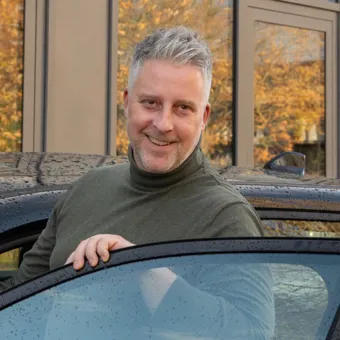
Questions about short lease? Gideon is happy to help you get started!
We are happy to work with you to find a suitable short lease solution.
Brands
A selection of our brands
We supply all brands and all classes of passenger cars and commercial vehicles. Whether you are looking for a BMW, Audi, Tesla or Volvo.

Kia

Renault

Volkswagen

BMW

Skoda

Volvo
Categories
SUV

Hatchback

Estate

Van
Saloon

Minibus

SUV
Hatchback
Estate
Van
Saloon
Minibus
SUV
Hatchback
Estate
Van
Saloon
Minibus